
Comparison · Updated
Raspberry Finance vs YNAB: forecast your cash or budget every dollar?
YNAB and Raspberry Finance both want you to stop worrying about money, but they start from different questions. YNAB asks you to give every dollar a job, by hand. Raspberry reads your accounts and bills and tells you how much is safe to spend today, and when cash will be tightest in the months ahead. We make Raspberry, so we have also been plain about where YNAB fits better.
The short answer
- Choose Raspberry if you want to know where you stand without keeping a budget by hand. You get one number to check today, a forecast of the months ahead, and alerts before a bill or a cash shortfall catches you out, all built from the bills and income already in your accounts.
- Choose YNAB if you want a hands-on category budget. You decide in advance what each dollar is for, and you want native phone apps and a plan you share with a partner.
Two different questions
Raspberry starts from cash flow. It finds your recurring bills and income, sets aside what is due in the next 30 days, and shows what remains as Safe to Spend. Then it projects your cash forward, so a tight week does not arrive as a surprise.
YNAB is a budgeting method with an app built around it. You assign the money you have to categories, and each category shows what is left. It works well for people who enjoy the routine, and it takes regular attention: each new paycheck has to be assigned.
At a glance
| Feature | Raspberry Finance | YNAB |
|---|---|---|
| Main idea | Safe to Spend and a cash forecast | Give every dollar a job |
| Setup | Connect accounts, then confirm the bills it finds | Build categories and assign your money |
| Looking ahead | 60-day cash outlook and 12-month forecast, with an alert if cash may run short | Budget the money you have now, with targets for future goals |
| Bills and income | Detected from your history, with price changes followed; you confirm them | Scheduled transactions you enter |
| Category budgets | No; upcoming bills and card minimums are set aside automatically instead | Yes, the core of the product |
| Savings goals | What-if planning, including months to reach a savings target | Targets with progress tracking |
| Debt | Payment calendar, utilization per card, minimums set aside, and payoff scenarios | Loan planner |
| AI assistant | Built-in chat using your own AI key; also connects to assistants such as Claude. In early access, not on every account yet | No built-in assistant listed; public API |
| Phone | Works in your phone's browser and can be added to your home screen | Native apps, with offline access and widgets |
| Sharing | One person per account | Up to six people on one subscription |
| Price | Free plan; Pro is $4.99 a month ($59.88 over a year) | $14.99 a month or $109 a year, after a 34-day free trial |
One number instead of a budget
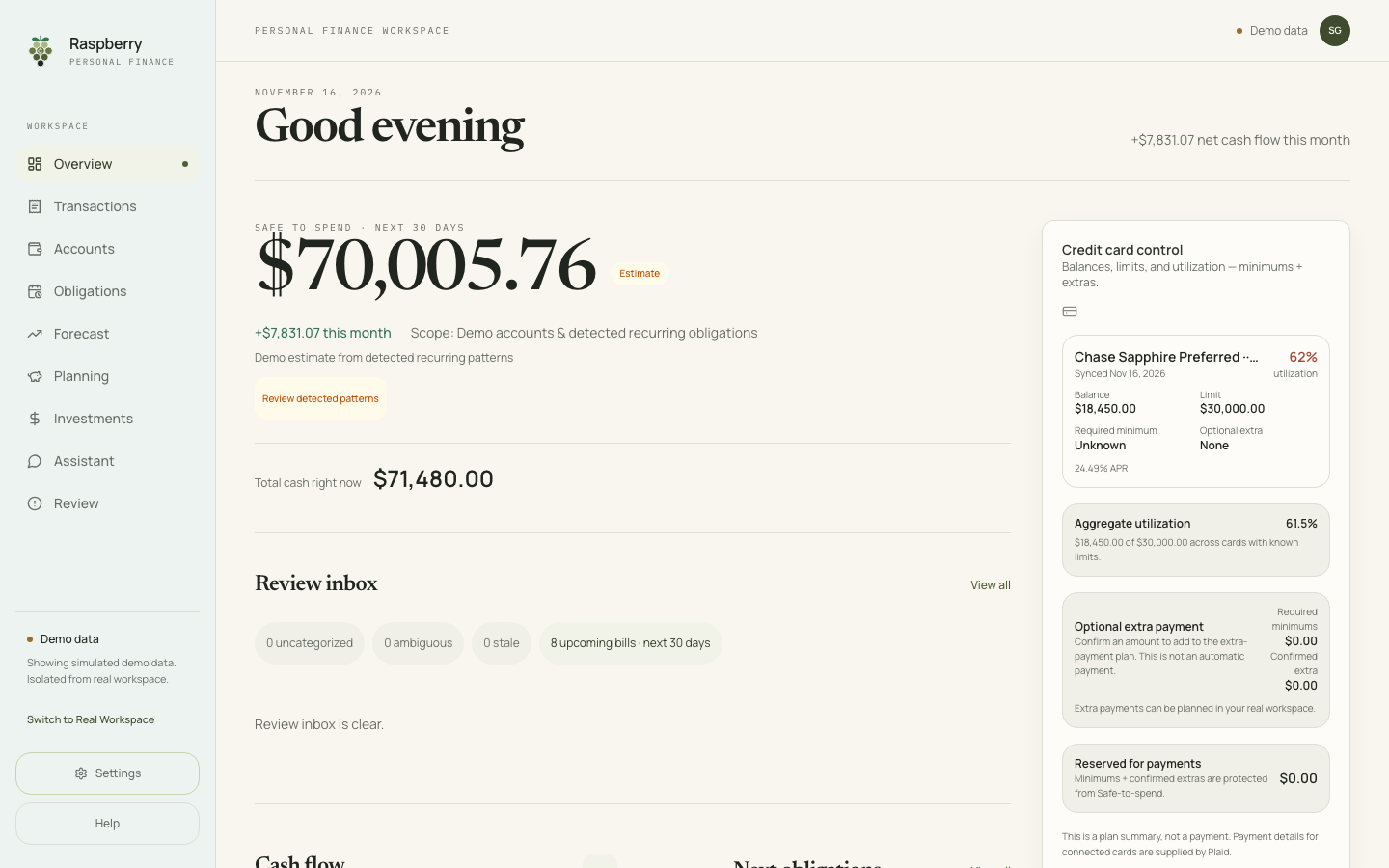
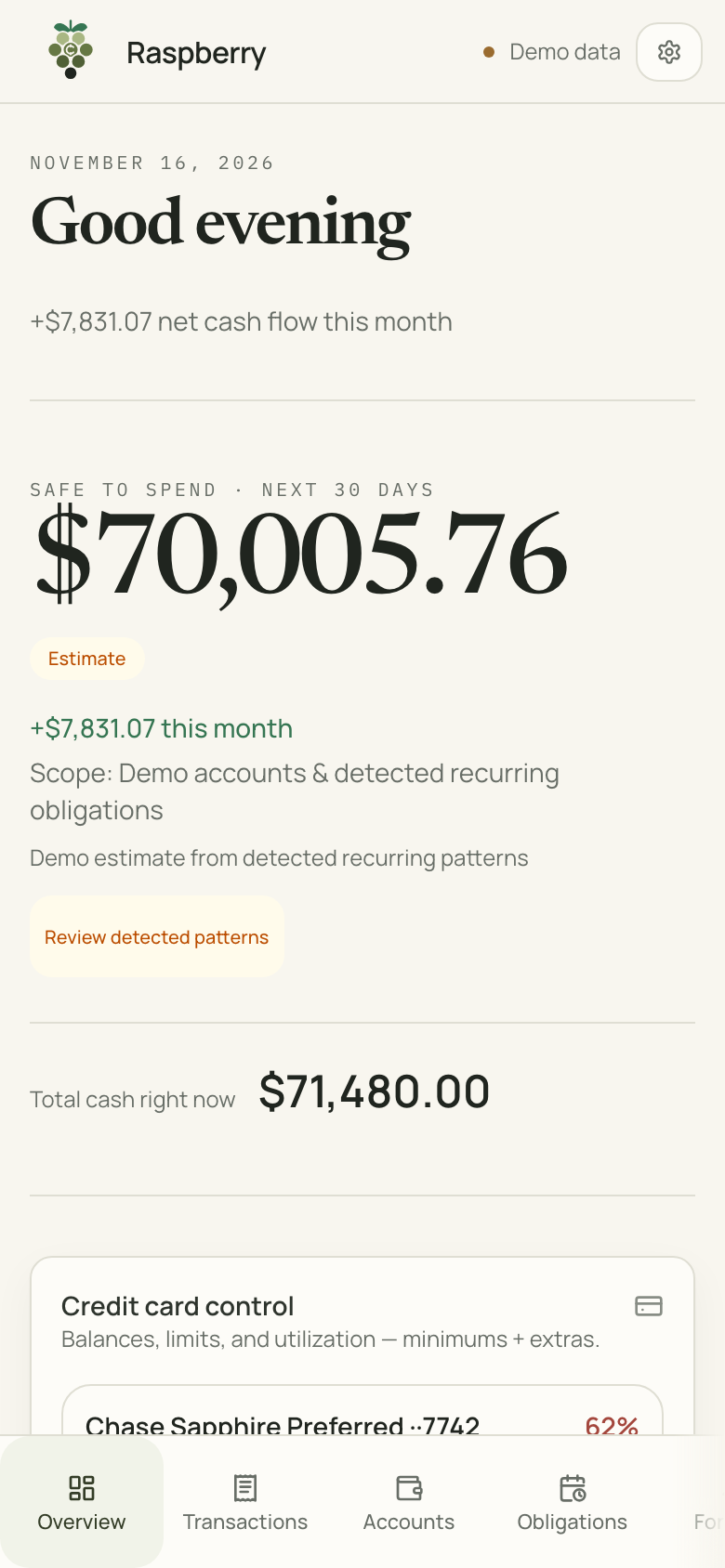
The Today screen opens with Safe to Spend: your cash, minus confirmed bills and card minimums due in the next 30 days, minus an optional cushion you choose. Total cash sits right below it, so you can always see how the number was reached.
See the tight week before it arrives
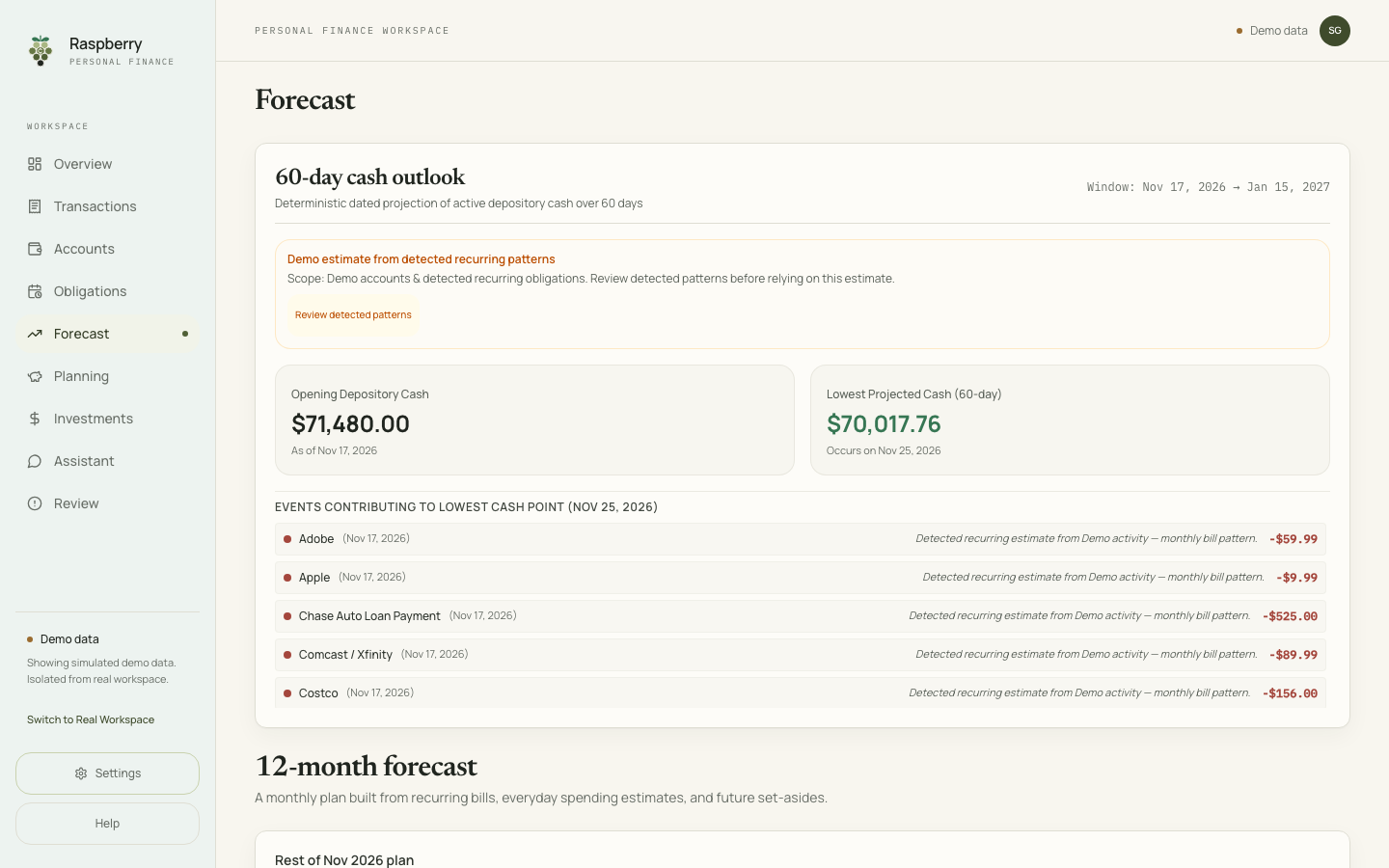
The Ahead tab shows the lowest point your cash is expected to reach in the next 60 days, the date it happens, and the bills and paychecks behind it. If that outlook shows cash dropping below zero in the next 14 days, Raspberry can alert you in the app or by email.
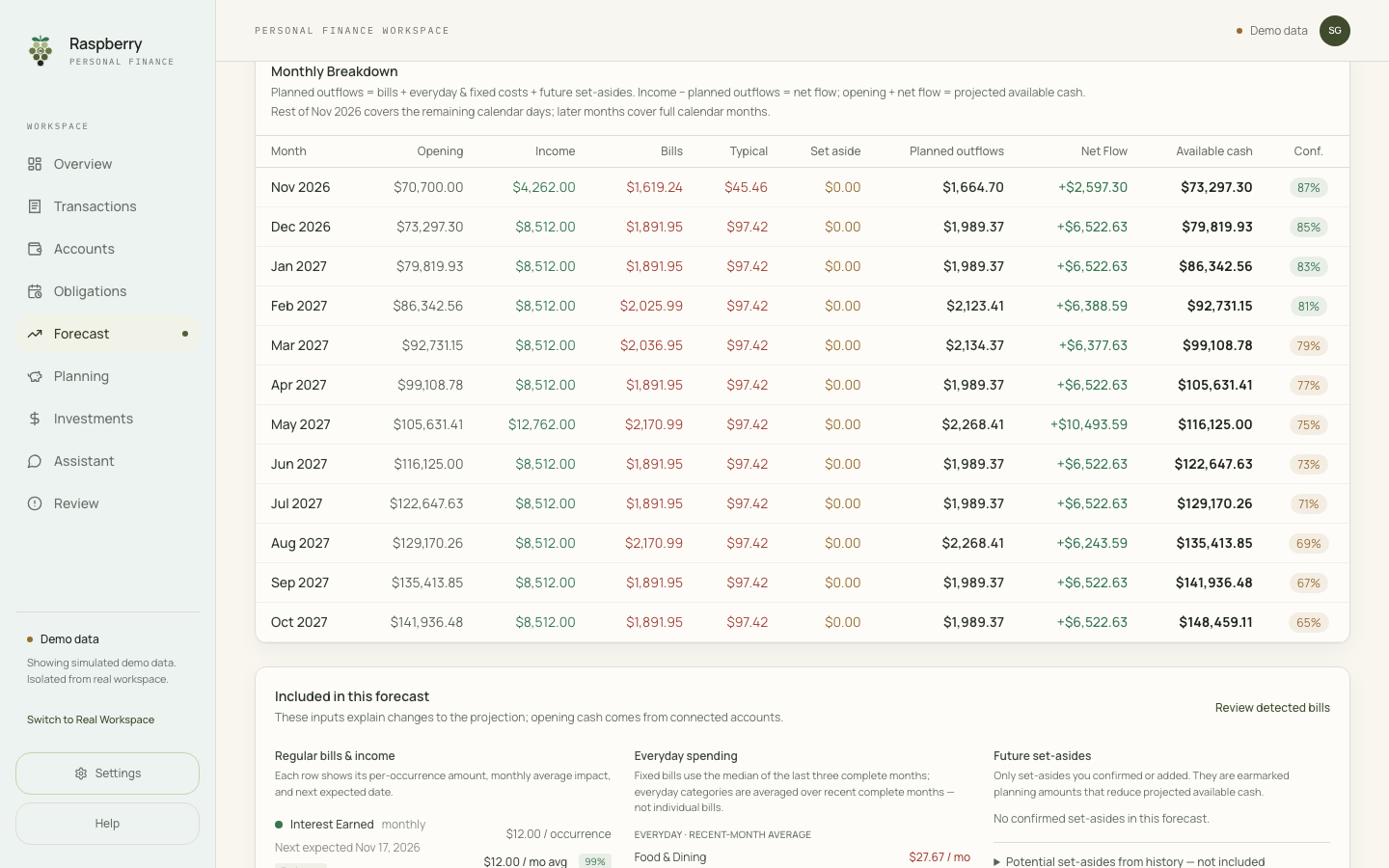
Below that, a 12-month table lays out income, bills, everyday spending and the cash left each month, with a confidence figure that falls as the months get further away.
Bills found for you
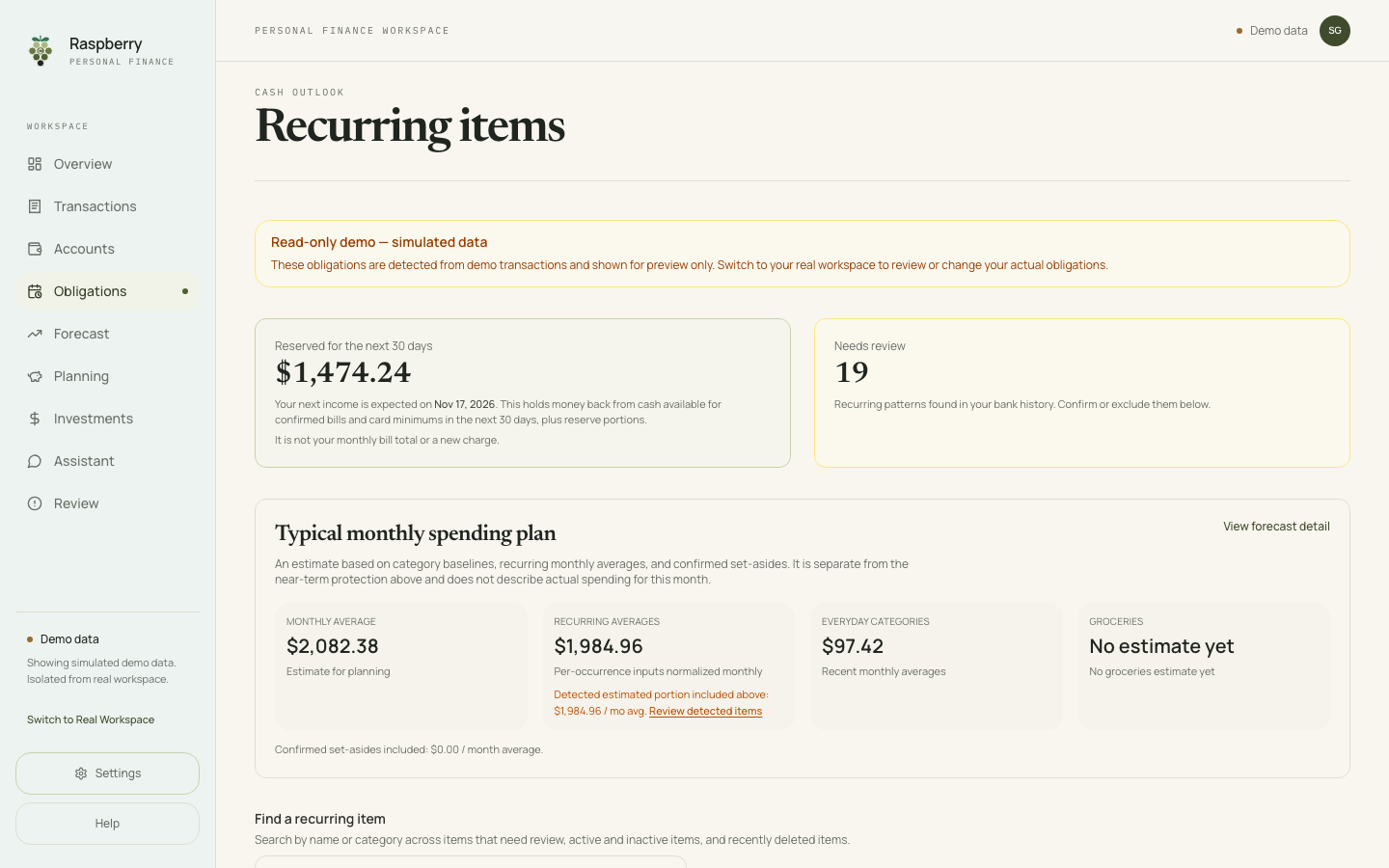
Raspberry reads your transaction history and proposes recurring bills and income: rent, subscriptions, insurance, paychecks. You confirm, edit or exclude each one. Confirmed bills are what Safe to Spend protects. A bill that looks unpaid stays set aside, with a Mark paid button for payments your bank feed missed. Raspberry can also remind you three days before a confirmed bill or card payment is due.
Where the money went
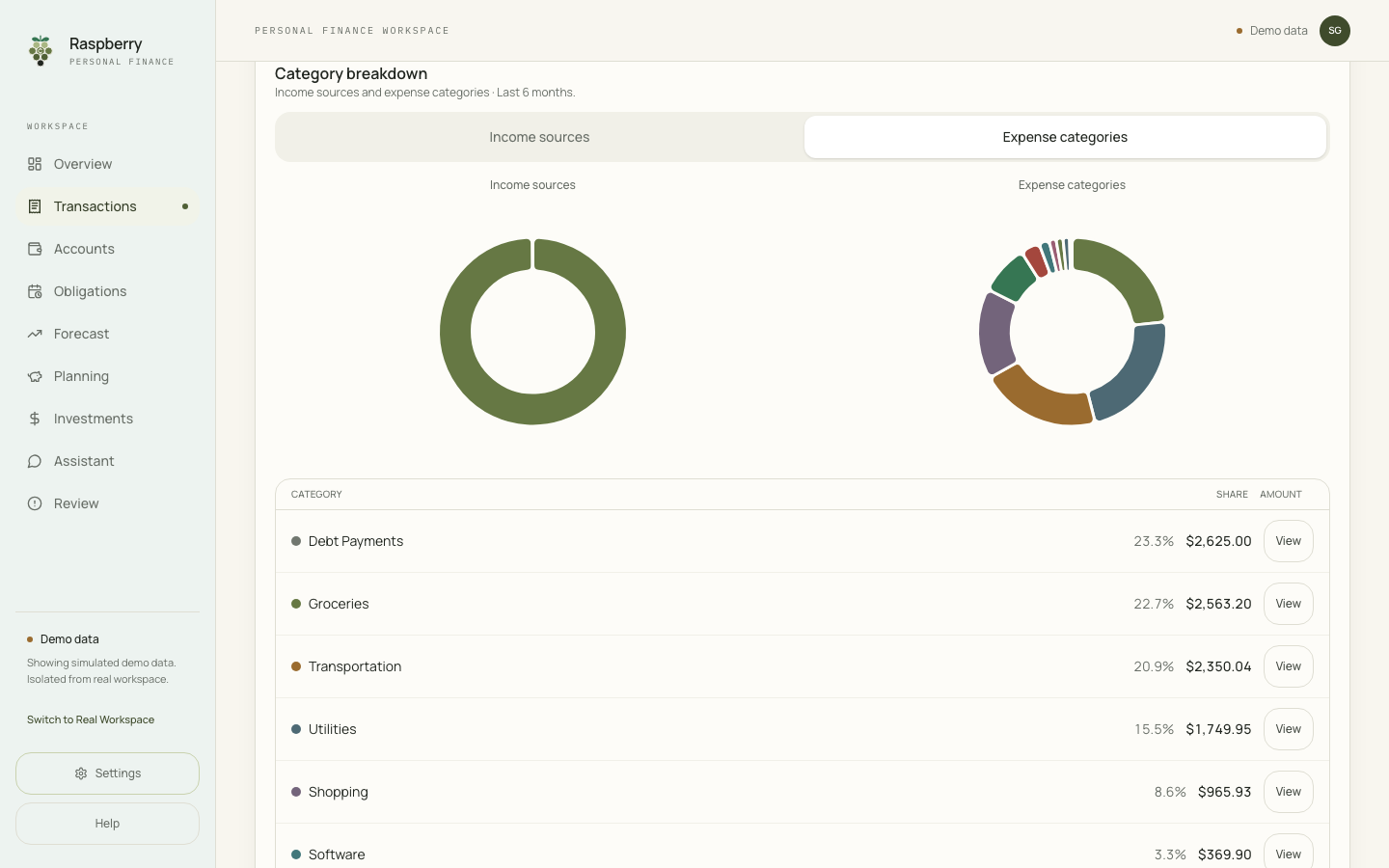
Transactions are categorized as they arrive, with a breakdown of income sources and spending categories for any period. You can correct a category at any time. Linked investment accounts get their own tab with holdings and allocation.
On your phone
Raspberry runs in your phone's browser with the same screens, and you can add it to your home screen like an app. There is no native app yet.
Where Raspberry is the better choice
- You do not want to keep a budget. There are no categories to fund and nothing to assign each time you are paid. Connect your accounts, confirm the bills it finds, and Safe to Spend is ready. It updates itself as transactions arrive.
- You want to see ahead. The 60-day cash outlook and 12-month forecast show when cash will be tightest, and an alert warns you if the forecast drops below zero in the next 14 days. YNAB budgets the money you already have rather than projecting future balances.
- You have a lot of recurring bills. Raspberry finds bills, subscriptions and paychecks in your history and follows price changes, so you do not schedule each one by hand. It can remind you three days before each confirmed bill is due.
- You want your investments in the same place. Linked investment accounts show holdings, allocation and your largest position next to your cash.
- You carry credit card balances. A payment calendar, utilization for every card and payoff scenarios sit next to your cash, and card minimums are set aside before Safe to Spend.
- You want to ask questions about your money. Raspberry has a built-in AI assistant that answers from your own transactions, bills and forecast. It's in early access and isn't on every account yet. You bring your own key from Anthropic, OpenAI or DeepSeek, and you can also connect an outside assistant such as Claude.
- You want to pay less. Pro is $4.99 a month, or $59.88 over a year, against $109 a year or $14.99 a month for YNAB. The free plan covers manual accounts and CSV or OFX file import.
Where YNAB is the better choice
- You want a hands-on category budget. Raspberry has no category budgets or rollovers. If deciding what each dollar is for is what keeps you on track, YNAB is built for that.
- You are saving toward specific goals. YNAB targets track progress for each category. Raspberry's What-if tab estimates how many months a savings target will take, but does not track progress toward it over time.
- You budget with a partner. YNAB lets up to six people share one subscription. A Raspberry account is for one person.
- You want native apps. YNAB has apps for phone, tablet and computer, with offline access and widgets.
- Your bank is outside the United States. Raspberry's automatic bank connection supports US institutions. Elsewhere you would use manual accounts or file import, so check which countries YNAB's bank import covers.
Price
Raspberry has a free plan for manual accounts and CSV or OFX file import. Pro adds bank connections and automatic sync for $4.99 a month. Eligible new subscribers may get the first month for $1; your Billing page shows the current offer.
YNAB costs $14.99 a month or $109 a year, after a 34-day free trial that needs no credit card.
Over a year, Raspberry Pro costs $59.88: about half of YNAB's annual plan and a third of its monthly price. Prices were checked on November 15, 2026 and may change.
Which should you pick?
If you want to know what is safe to spend today and what the next few months look like, without keeping a budget by hand, try Raspberry. If building a category budget is the habit you want, YNAB is a good fit.
YNAB is a trademark of its owner. Raspberry Finance is not affiliated with or endorsed by YNAB. YNAB details come from ynab.com as of November 15, 2026. Screenshots show Raspberry's Demo Mode with sample data.